
Using the browser extension
Install the MomentumHive browser extension for Chrome or Firefox and use AI-powered Threads assistance directly on threads.net.
Where to find it
The app has a dedicated Extension page at /extension, and there is also an Extension link near the bottom of the main sidebar.
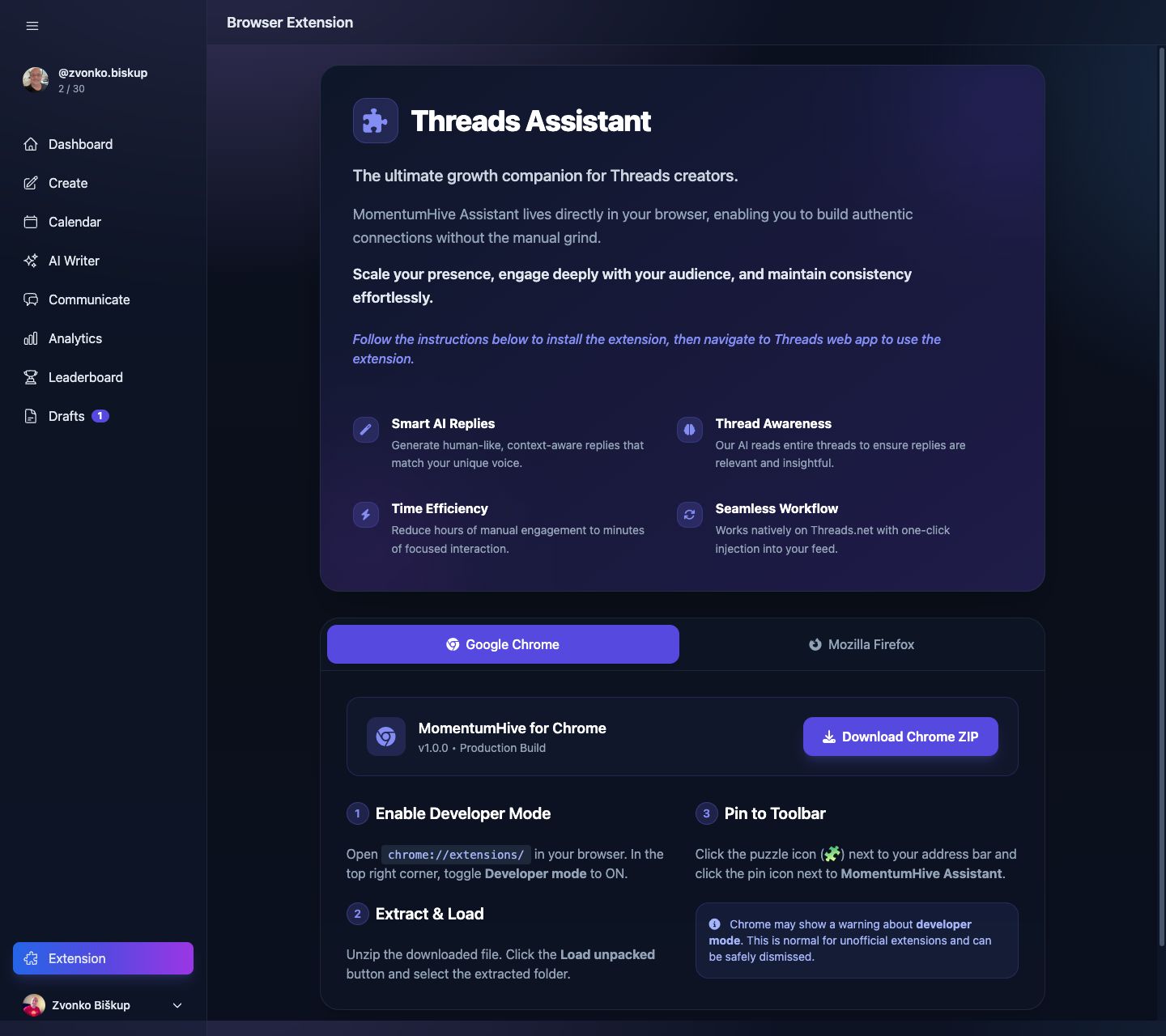
What the extension is for
The real extension page presents the browser extension as Threads Assistant. Its current help-facing purpose is assisting you directly on threads.net so you can interact without constantly switching back into the main app.
- Smart AI replies for Threads conversations.
- Thread awareness so the AI can respond with context.
- In-browser workflow on the Threads web app.
- Faster engagement without manual copy-paste.
Supported browsers
The current extension page documents two install paths:
- Google Chrome via a downloaded ZIP loaded with Load unpacked.
- Mozilla Firefox via a downloaded ZIP loaded as a Temporary Add-on.
Chrome installation
- Open
chrome://extensions/. - Turn on Developer mode.
- Download the Chrome ZIP from the Extension page.
- Unzip it.
- Click Load unpacked and select the extracted folder.
- Pin the extension from Chrome’s puzzle menu if you want easier access.
Firefox installation
- Open
about:debugging#/runtime/this-firefox. - Download the Firefox ZIP from the Extension page.
- Unzip it.
- Click Load Temporary Add-on....
- Select a file from the extracted extension folder.
Firefox installation is currently documented as temporary. The extension must be loaded again after the browser restarts unless a signed build is used.
What it actually talks to in the app
The shipped extension endpoints in this codebase are:
/extension/statusfor extension credit and usage status./extension/repliesfor AI-generated reply options.
Reply limits
The extension uses the app’s AI reply allowance, with a stricter free-plan cap in the extension flow. In the current code, free users get only 2 extension AI replies before they need a paid plan or credits.
If extension replies are weak or off-brand, check your selected Threads profile, AI Profile, and optional Writing Style first. The extension reply generator depends on that same profile context.
Support
If installation or extension behavior fails, open the in-app Support page or see How to contact support.